
Guides
Share to-dos with friends and encourage each other
In Aido, you can see friends' public to-dos and encourage them with nudges, comments and replies. Manage your own to-do list and choose what to share. Keep personal to-dos private, and use the app on your own whenever you prefer.
Content reviewed ·
Start with these steps
Find a friend by name or hashtag
Open friend management and tap the search icon. Search by name or unique eight-character hashtag. Use the hashtag to identify the right person when names are similar.
Send a friend request
Tap Add in the search results. Your friend can accept in received requests. Check the sent and received request tabs to follow the status.
Choose which to-dos to share
Choose Public or Private when creating or editing a to-do. Friends can only see public to-dos. If you turn a personal note into a to-do, check the created to-do's visibility too.
Send a little encouragement
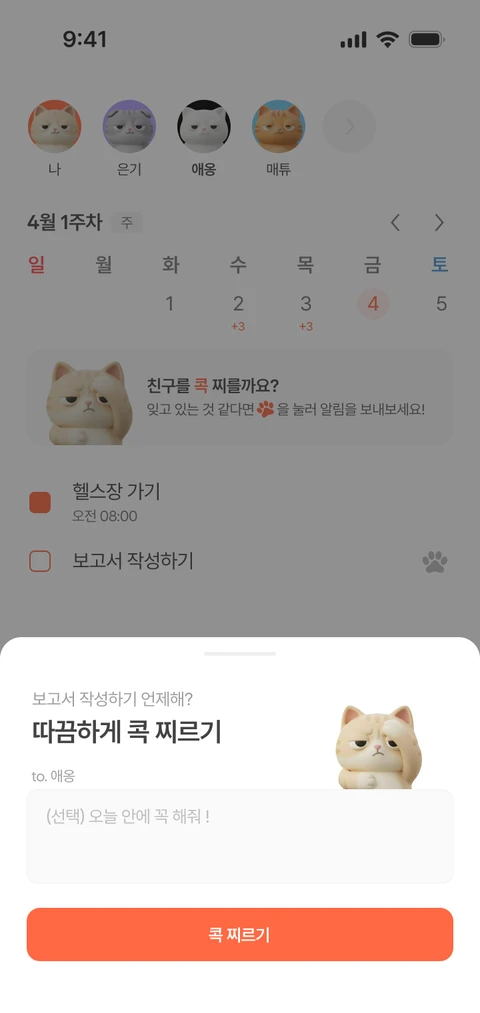
See public to-dos in your friend's calendar. Send a nudge as a reminder, or open a to-do's detail screen to leave a comment or reply.
Try it in your day
If you and a friend want to keep exercising, share the activities you want encouragement with.
- My to-do: Walk for 30 minutes after work. Set it to Public so my friend can see it.
- Check a friend's public exercise plan and send a nudge or a comment such as 'Let's keep going today!'
- Keep personal plans private and follow completed exercise in the friend's calendar.
Comments and nudges are sent to real friends. Choose a way to encourage each other that feels comfortable.
Choose visibility for each to-do
Share the to-dos you want friends to see by setting them to Public. Set personal ones to Private. A friend's calendar only shows activity from public to-dos.
Keep conversations going with replies
Read comments in a to-do's detail screen and reply to a specific comment. Expand a conversation to read its replies, or tap a comment notification to jump to that comment.
Start free, with more room when you need it
- Free
- Add up to five friends and send up to three nudges a day. View public to-dos and encourage friends with comments.
- Premium
- Add friends and send nudges without daily count limits. Wait 24 hours before nudging the same to-do again.
Check the app for current subscription prices and full terms.